
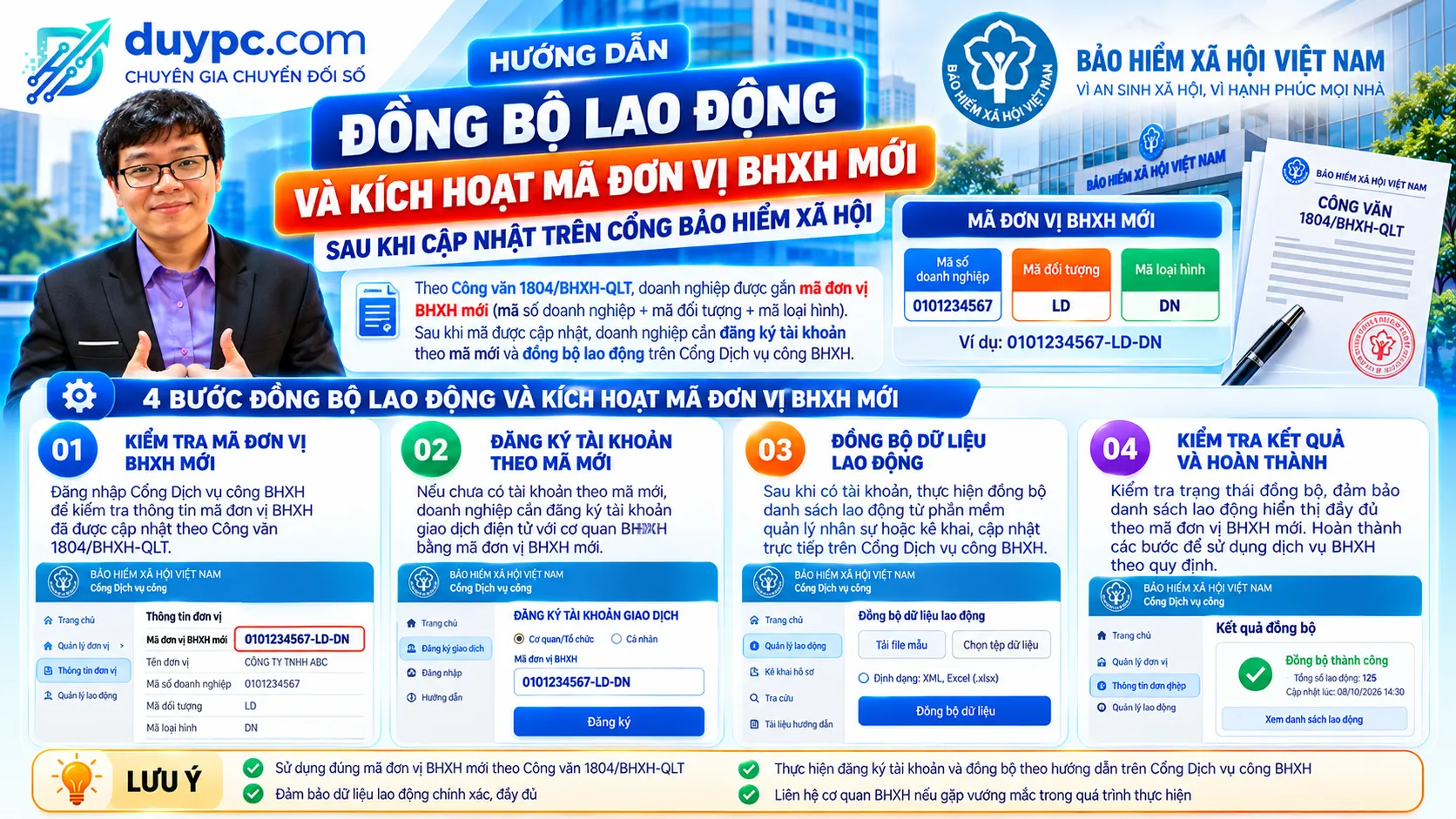
- 1 Aug 2025 – Letter 1804 applies
- ĐD+ĐT+LH – New code structure
- 4 steps – Activate and sync
- Citizen ID – Replaces SI number
📋 Why companies must activate their new social insurance unit code
On 4 August 2025, Vietnam Social Security issued Official Letter 1804/BHXH-QLT on using personal identification numbers/citizen IDs instead of social insurance numbers and new management codes, applied from 1 August 2025:
- ✅ Participants in social and health insurance use their personal ID / citizen ID (CCCD) number instead of a social insurance number.
- ✅ Employers receive a new unit code, replacing old codes such as TD0001D.
- ✅ Once updated, employers must register an account under the new code on the Social Insurance Public Service Portal and sync their employee list to keep filing.
📄 Official Letter 1804/BHXH-QLT of 4 August 2025 – Personal ID numbers replace social insurance numbers; new management codes - PDF (Vietnamese). Tải về
🔢 Structure of the new unit code
The employer code has 3 joined components: ĐD + ĐT + LH.
- ĐD - unit identifier – Meaning: Companies: enterprise code issued by the business registration office. Budget-related units: budget relationship code; Length: 10 characters (company) / 7 (budget code)
- ĐT - participant type code – Meaning: Participant type managed in the social insurance database; Length: 2 letters
- LH - business type code – Meaning: Per Vietnam's economic sector classification (Decision 27/2018/QD-TTg); Length: 3 characters
💡 Example: old codeTD0001Dmay become0123456789DNA03-0123456789is the enterprise code,DNthe participant type andA03the business type. Each unit's ĐT and LH codes follow the appendices to Letter 1804.
🛠️ 4 steps to sync employees and activate the new code
Bước 1: Step 1: Look up and note your new unit code
Find the new code updated by the social insurance office (via its notice or the lookup on the public service portal) and note it exactly.
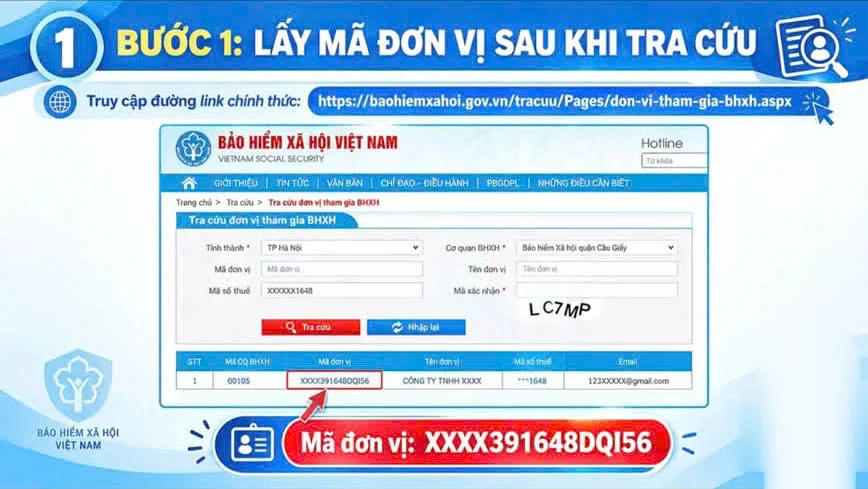
Step 1: Look up and note the new unit code
Bước 2: Step 2: Open the Social Insurance Public Service Portal and click Register
Go to dichvucong.baohiemxahoi.gov.vn and choose Đăng ký (Register) to create an account under the new code.
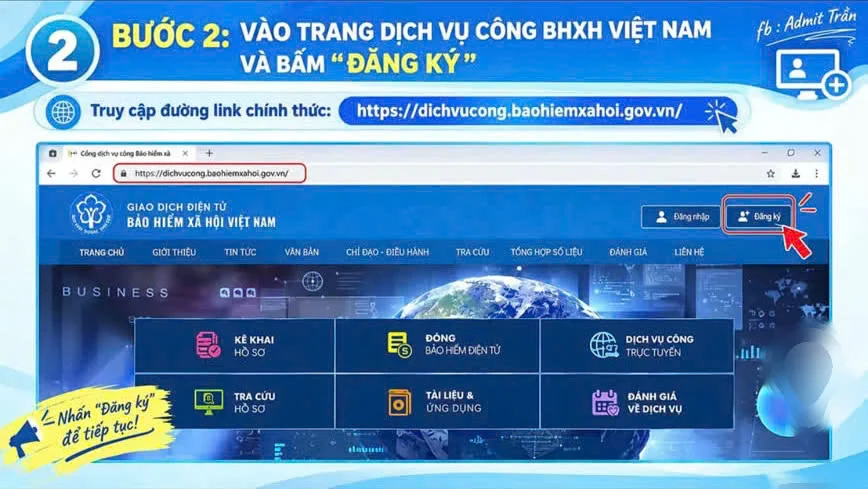
Step 2: Open the Vietnam Social Security public service portal and click Register
Bước 3: Step 3: Choose Organization, fill in details and register
Select Tổ chức (Organization), enter the new unit code and company details as required, check carefully and click Đăng ký.
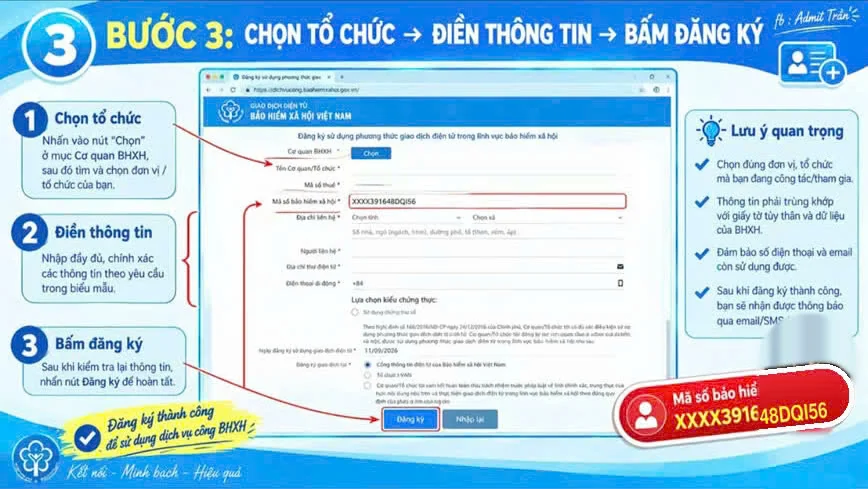
Step 3: Choose Organization, fill in details and register
Bước 4: Step 4: Go to Declarations → Employee management → Import from social insurance
After logging in with the new account, open Kê khai (Declarations) → Quản lý lao động (Employee management) → Nhập vào từ BHXH (Import from social insurance) to sync your current employees from the social insurance database.
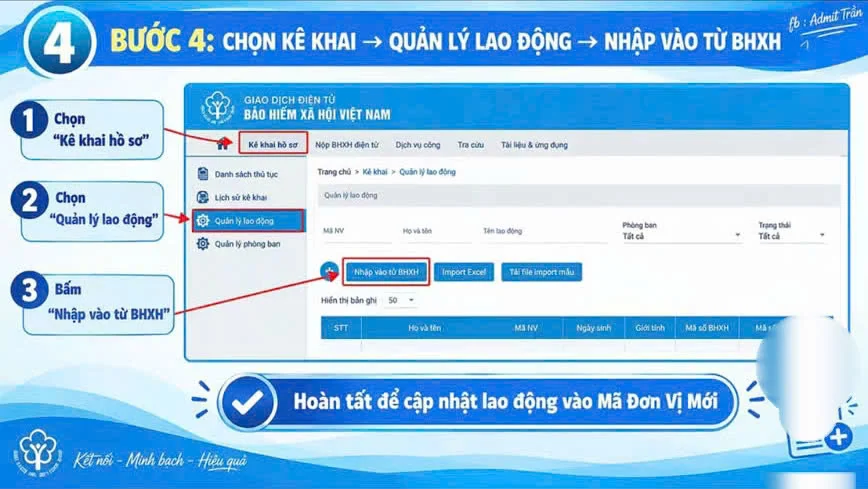
Step 4: Declarations, employee management, import from social insurance
⚠️ After syncing
- Reconcile the employee list: Compare headcount and contribution bases with HR records and payroll; contact your local social insurance office about any mismatch.
- Update employees' personal ID numbers: Citizen ID data must match the national population database, since it replaces the social insurance number.
- Update the code in your filing software: If you file through an I-VAN service or accounting/HR software, update the new unit code to avoid rejected submissions.
- Check your digital signature: Electronic social insurance filings require a valid company digital signature.
- Ask your local office if the code is missing: If the new code does not appear or details are wrong, contact the social insurance office where you are registered.
❓ FAQ on the new social insurance unit code
When does Letter 1804/BHXH-QLT apply?
Issued on 4 August 2025, it applies the use of personal ID/citizen ID numbers instead of social insurance numbers, and new management codes, from 1 August 2025.
What does the new unit code contain?
Three parts: ĐD (unit identifier - the 10-character enterprise code for companies), ĐT (2-letter participant type) and LH (3-character business type). Example: 0123456789DNA03.
How do I sync employees on the portal?
Log in with the account under the new code, then Kê khai (Declarations) → Quản lý lao động (Employee management) → Nhập vào từ BHXH (Import from social insurance).
Do employees still use social insurance numbers?
Under Letter 1804, personal ID/citizen ID numbers replace social insurance numbers for participants.
What if I cannot find the new code?
Contact the local social insurance office where your company is registered.
Do I need to update my I-VAN software?
Yes. Update the new unit code in your e-filing software to avoid rejected submissions, and check that your digital signature is valid.
📰 Legal basis and sources
- Công văn 1804/BHXH-QLT ngày 04/8/2025 (bản PDF) - duypc.com
- Hướng dẫn đồng bộ lao động và kích hoạt mã đơn vị BHXH mới sau khi cập nhật trên Cổng Bảo hiểm xã hội - thuvienphapluat.vn
- Sử dụng số định danh cá nhân/căn cước công dân thay mã số BHXH - lsvn.vn
- Cổng Dịch vụ công BHXH Việt Nam - dichvucong.baohiemxahoi.gov.vn
ℹ️ For reference only, based on Letter 1804/BHXH-QLT and legal sources (Vietnamese originals; unofficial translation). The portal interface may change; each unit's ĐT and LH codes follow the letter's appendices or local office guidance.