
- v2.0 – NEAC specification, 2026
- 4 APIs – HTTP POST, JSON
- 17 steps – Signing flow
- Hash only – No file contents sent
📋 What is the NEAC eSign Gateway?
The Public Digital Signature Certification Service Gateway (the eSign Gateway, at esign.neac.gov.vn) is operated by Vietnam's National Electronic Authentication Centre (NEAC). It acts as a hub: software or information systems with signing features integrate once with the Gateway and can then send remote-signing requests to certificates issued by many different public certification authorities (CAs).
The integration specification, version 2.0 (NEAC, 2026) sets out how to connect, under Article 8.3 of Circular 15/2025/TT-BKHCN.
- Law on E-Transactions No. 20/2023/QH15 (22 June 2023): Framework law on e-transactions and e-signatures
- Decree 23/2025/ND-CP (21 February 2025): E-signatures and trust services
- Circular 15/2025/TT-BKHCN (15 August 2025): Technical requirements for signing software, signature verification software and the public certification service gateway
📄 eSign Gateway integration specification (version 2.0) – National Electronic Authentication Centre (NEAC), 2026 - Word file (Vietnamese). Tải về
🔗 Connection model: user - system - eSign Gateway - CA
Signers use a certificate issued by a public CA and work entirely inside the information system's interface (accounting, e-invoice, e-contract software, service portals...). Signing requests pass through the eSign Gateway, which routes them to the right CA. The CA authenticates the user through its app on the user's device, signs, and returns the signature to the Gateway, which logs the transaction and passes the signature back to the system to embed in the document.
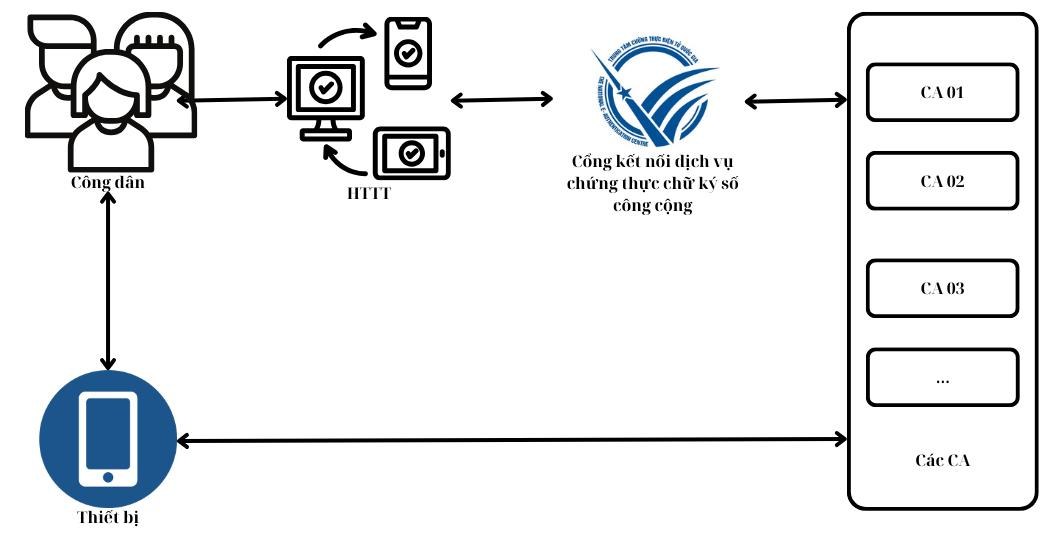
eSign Gateway connection model - source: NEAC specification v2.0 (Vietnamese)
🔒 Key security point: the system sends only the Base64 hash of the file. The eSign Gateway never receives file contents; embedding the signature is done by the system.
🔄 The 17-step signing flow
- Prepare (steps 1-2): The user uploads a file and clicks sign; the system hashes it using the secure hash standard in Circular 15/2025/TT-BKHCN.
- Get the certificate (steps 3-6): The system calls the Gateway (authenticated with Gateway-issued credentials); the Gateway routes to the CA and returns certificate data.
- Request signing (steps 7-9): The system sends the signing request with the Base64 hash; the Gateway returns a
transaction_idand forwards the request to the CA. - Authenticate and sign (steps 10-13): The CA pushes an authentication request to the signer's device; the signer confirms in the CA app; the CA signs the hash and returns the signature to the Gateway.
- Retrieve and finish (steps 14-17): The system uses the
transaction_idto fetch the Base64 signature, embeds it in the original file and returns the signed file to the user.
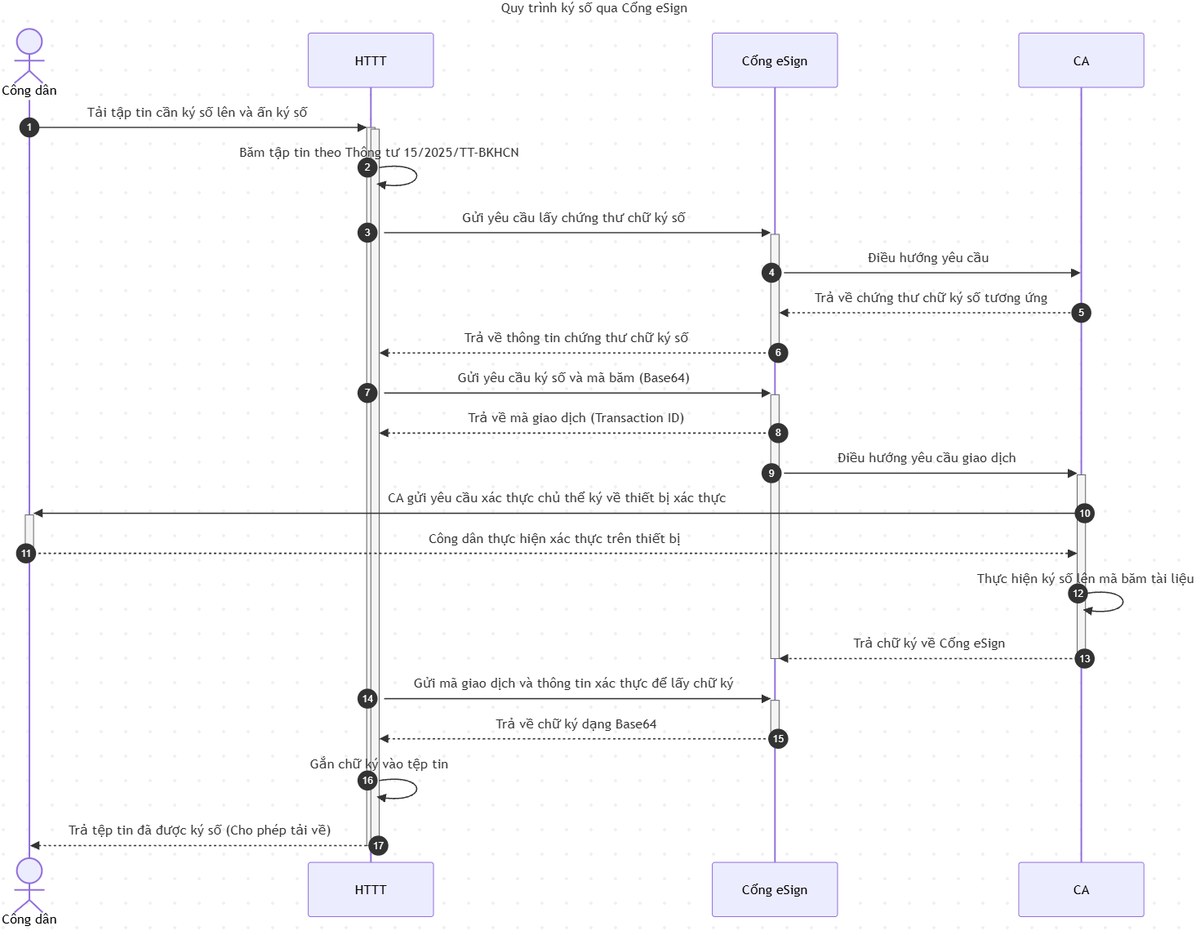
Signing flow through the eSign Gateway - source: NEAC specification v2.0 (Vietnamese labels)
🧩 The 4 APIs and environments
All APIs use HTTP POST, header Content-Type: application/json, JSON payloads.
- 1 List public CAs
/signing/remotesigning/ca_providers– Key request fields: -; Returns: - - 2 Get the signer's valid certificates
/signing/remotesigning/get_certificate– Key request fields:sp_idsp_passworduser_idca_nameserial_number; Returns: user_certificates (cert_id, cert_data, chain_data, serial_number) - 3 Submit a hash-signing request
/signing/remotesigning/sign– Key request fields:sp_idsp_passworduser_idca_namesign_filesserial_number; Returns:transaction_id - 4 Retrieve the signature value
/signing/remotesigning/get_status– Key request fields:sp_idsp_passworduser_idca_nametransaction_id; Returns: signatures (doc_id, signature_value)
- Production:
https://esign.neac.gov.vn - Sandbox:
https://esign-sandbox.neac.gov.vn
⚙️ Key parameters and sample requests
- ✅
sp_id,sp_password: credentials issued by the eSign Gateway to your system. - ✅
user_id: citizen ID (CCCD) or tax code of the signing individual or organization. - ✅
ca_name: public CA code (from API 1);serial_number: certificate serial number. - ✅
sign_files: files to sign, each withdata_to_be_signed(hash),doc_id,file_type(xml/json/pdf...),sign_type=hash. Multiple files per transaction are supported. - ✅
doc_idmust be shown both in your system and in the CA app so signers can match the document.
Sample signing request (/signing/remotesigning/sign):
{
  "sp_id": "xxx.apps.esign.com",
  "sp_password": "xxxxxxxx-xxxxxxxxxxxx",
  "user_id": "0123456789",
  "ca_name": "xxx-ca",
  "serial_number": "5404fffeb7033fb3...",
  "sign_files": [
    {
      "data_to_be_signed": "IBo1hd0NFdejK/grSmOA0tiPfgLnpcHY5Gufa2bfdbXJFLI=",
      "doc_id": "30c-7401-2562",
      "file_type": "pdf",
      "sign_type": "hash"
    }
  ]
}
Sample signature response (/signing/remotesigning/get_status):
{
  "status_code": 200,
  "esign_code": 2000,
  "message": "SUCCESS",
  "data": {
    "transaction_id": "xxx-8e43-4bdf-a601-ee7a756e9aeb",
    "signatures": [
      { "doc_id": "30c-7401-2562", "signature_value": "U3TNGFftSJoDjYiClGRE5SMP..." }
    ]
  }
}
⏳ Signatures may not be ready immediately: until the signer confirms in the CA app,signature_valueis empty. Pollget_statusat a sensible interval and handle refusals (status501, esign_code4000).
🚦 status_code and esign_code reference
200: Success400: Invalid document401: Invalid authentication data402: Malformed hash403: Invalid certificate or user_id404: Transaction not found405: Invalid sp_id / sp_password500: System error501: Signing failed or user declined
esign_code: 2000 in the successful sample response; 4000 = signer declined.
✅ Implementation checklist for businesses and developers
- Register with NEAC: Contact the eSign Gateway to obtain
sp_idandsp_password; see esign.neac.gov.vn/IntegrationGuide. - Integrate and test in the sandbox: Exercise all 4 APIs on
esign-sandbox.neac.gov.vn, including errors 401-405 and declined signatures. - Hash per Circular 15/2025/TT-BKHCN: Send only the Base64 hash; keep the original file in your system for embedding the signature.
- Show doc_id in your UI: Signers must see the same document code in your system and the CA app before confirming.
- Embed and return the signed file: Embed the signature in the right format (PDF, XML, JSON...) and verify it with signature verification software before go-live.
- Protect credentials: Keep
sp_id/sp_passwordserver-side - never in mobile apps or browser JavaScript.
❓ FAQ on the NEAC eSign Gateway
What is the NEAC eSign Gateway for?
The eSign Gateway (esign.neac.gov.vn), operated by NEAC, connects systems to public digital signature certification services. One integration lets software send remote-signing requests to certificates from many public CAs.
Does the Gateway receive document contents?
No. Systems send only the Base64 hash of the file. The Gateway does not receive file contents; the system embeds the signature itself.
How many APIs are there?
Version 2.0 defines 4 HTTP POST APIs: list public CAs (ca_providers), get certificate (get_certificate), sign hash (sign) and get signature (get_status).
What is the sandbox environment?
The sandbox domain is https://esign-sandbox.neac.gov.vn; production is https://esign.neac.gov.vn.
How do I get sp_id and sp_password?
These are credentials issued by the eSign Gateway to connecting systems. Contact NEAC following esign.neac.gov.vn/IntegrationGuide.
What does error 501 mean?
status_code 501 means signing failed or the user declined; esign_code 4000 indicates the signer declined.
📰 Legal basis and sources
- Tài liệu đặc tả kỹ thuật kết nối Cổng eSign, phiên bản 2.0 (bản Word) - duypc.com
- Hướng dẫn tích hợp Cổng kết nối dịch vụ chứng thực chữ ký số công cộng - esign.neac.gov.vn
- Trung tâm Chứng thực điện tử quốc gia (NEAC) - rootca.gov.vn
ℹ️ This article summarizes NEAC's specification v2.0 (Vietnamese original; unofficial translation) for reference only. Always use the latest documentation at esign.neac.gov.vn/IntegrationGuide when integrating.